Every growing business reaches the same point. The spreadsheets are breaking, the team is using six different tools that do not talk to each other, and someone says, "We need an ERP." Then the real question comes: do you buy a ready-made system, or build a custom ERP around the way your business actually works?
There is no answer that fits everyone. Off-the-shelf ERP software is the right choice for many companies. For others, it becomes an expensive system the team works around instead of working in. This guide explains the real differences, the hidden costs on both sides, and a simple way to decide what fits your business.
What Is an ERP, in Plain Words?
An ERP (Enterprise Resource Planning) system is one place where the core work of a business lives: projects, people, clients, inventory, orders, invoices and reports. The point is not the software itself. The point is that everyone works from the same data, so a sale, a task or a payment updates everything connected to it.
Off-the-Shelf ERP: What You Get
Off-the-shelf ERP means ready-made platforms such as Odoo, NetSuite, SAP Business One or Zoho, usually sold as a monthly subscription per user.
Where it wins
- Fast to start. You can often begin within weeks, not months.
- Lower cost at the beginning. No big development bill before you see any value.
- Standard processes are already built. Accounting, purchasing and basic HR follow common rules that rarely change between businesses.
- Updates and hosting are handled for you.
Where it struggles
- You adapt to the software. If your workflow is different from the "standard" one, your team ends up with workarounds, extra spreadsheets or a process change nobody wanted.
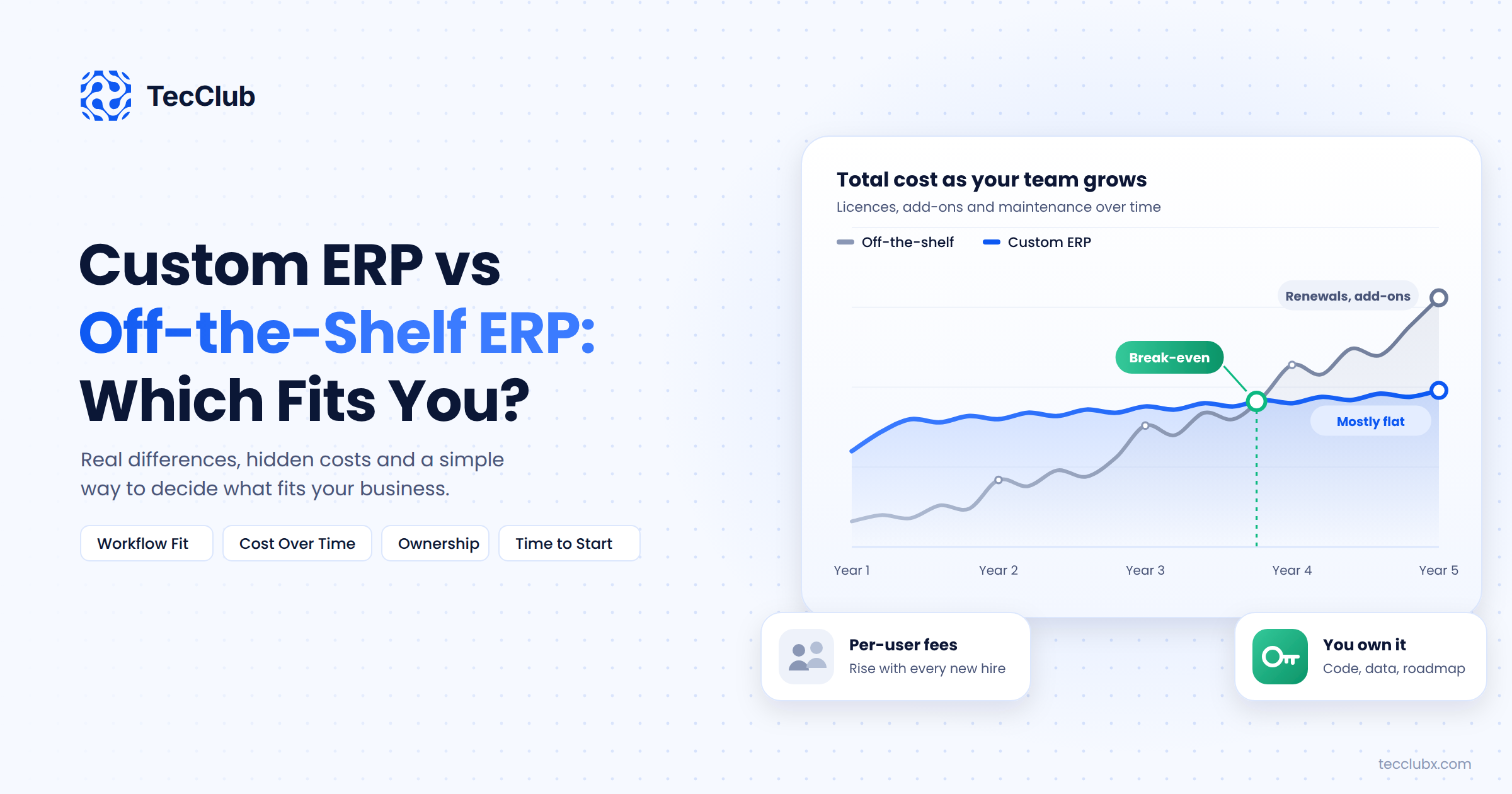
- Costs grow with every user. Per-user pricing looks small for ten people and very different for eighty.
- Customization gets expensive. Custom modules on top of a big ERP need specialist consultants, and they can break when the platform updates.
- Too many features. Teams often pay for large modules and use a small part of them, while the one thing they really need is missing.
Custom ERP: What You Get
A custom ERP is built around your business: your roles, your workflow, your reports, your language. It only includes what you use.
Where it wins
- It fits how you already work. The software follows your process, not the other way around.
- No per-user fees. You pay to build and maintain it, not for every new hire.
- You own it. The code, the data and the roadmap are yours.
- It can become an advantage. If the way you deliver work is what makes you better than competitors, building that into your system protects it. We wrote more about this in how custom software creates competitive advantage.
Where it struggles
- Higher upfront cost. You pay for design and development before day one.
- It takes time. A first version usually takes a few months, depending on scope.
- Quality depends on your partner. A poorly planned custom system can be worse than a generic one.
- You need a maintenance plan. Someone has to fix bugs, add features and keep it secure.
Side-by-Side Comparison
| Factor | Off-the-shelf ERP | Custom ERP |
|---|---|---|
| Time to start | Weeks | A few months for a first version |
| Upfront cost | Low | Higher |
| Cost as you grow | Rises with every user and module | Mostly flat, plus maintenance |
| Fit with your workflow | Good for standard processes | Built around your process |
| Ownership | You rent access | You own code and data |
| Best for | Standard operations, small teams, fast start | Unique workflows, growing teams, long-term use |
The Hidden Costs Nobody Puts in the Quote
Both options have costs that only show up later. Ask about them before you decide.
With off-the-shelf ERP: implementation consultants, data migration, paid add-ons, training, price increases at renewal, and the time your team loses on workarounds every single day.
With custom ERP: scope creep when new ideas keep getting added, hosting and maintenance, and the risk of depending on one developer who leaves. A good contract, clean code and proper documentation solve most of this.
Signs a Custom ERP Makes Sense
- Your team uses three or more tools to finish one piece of work, and data gets copied between them by hand.
- You have tried a ready-made system and still run key parts of the business in spreadsheets.
- Your workflow is a real part of how you win clients, not just how things happen to be done.
- You need different views for different people, such as clients seeing progress but not internal notes.
- You plan to grow the team a lot, and per-user fees will add up fast.
Signs Off-the-Shelf Is the Better Choice
- Your processes are standard for your industry and you are happy to follow common practice.
- You need a system running in the next few weeks.
- Your main need is accounting and compliance, where ready-made tools are strong and well tested.
- You do not have the budget or time to plan a custom build right now.
The Middle Path: Start Small, Build What Matters
You do not have to choose all or nothing. Many businesses keep a ready-made tool for accounting and build a custom system for the part that makes them different, such as project delivery, client portals or field operations. The two connect through APIs.
If you go custom, start with a focused first version. Pick the two or three workflows that cause the most pain, build those well, and add more once the team is using it every day. It is the same thinking behind building an MVP, which we cover in how to build an MVP in 6 to 8 weeks.
A Real Example
XAP Coders, a software and freelancing agency, was running its work across separate tools for tasks, time tracking, chat, files and invoices. Instead of forcing a generic ERP onto an agency workflow, we built a custom ERP with role-based dashboards for admins, managers, team members and clients, plus a task board, attendance and time tracking, invoicing, built-in chat and AI insights. You can see how it came together in the XAP Coders ERP case study.
Final Thoughts
Choose off-the-shelf ERP when your processes are standard and speed matters most. Choose a custom ERP when your workflow is unique, your team is growing, and you want a system that fits the business instead of reshaping it. Whatever you pick, start with the problems that hurt the most today, not the longest feature list.
Thinking About a Custom ERP?
TecClub designs and builds custom ERP, CRM and business management systems with role-based dashboards, web and mobile access, and integrations with the tools you already use. We can help you decide if custom is right for you before you spend anything.
Talk to our team about your business system or email us at [email protected].