Understanding Inbounds and Outbounds in Sing-box
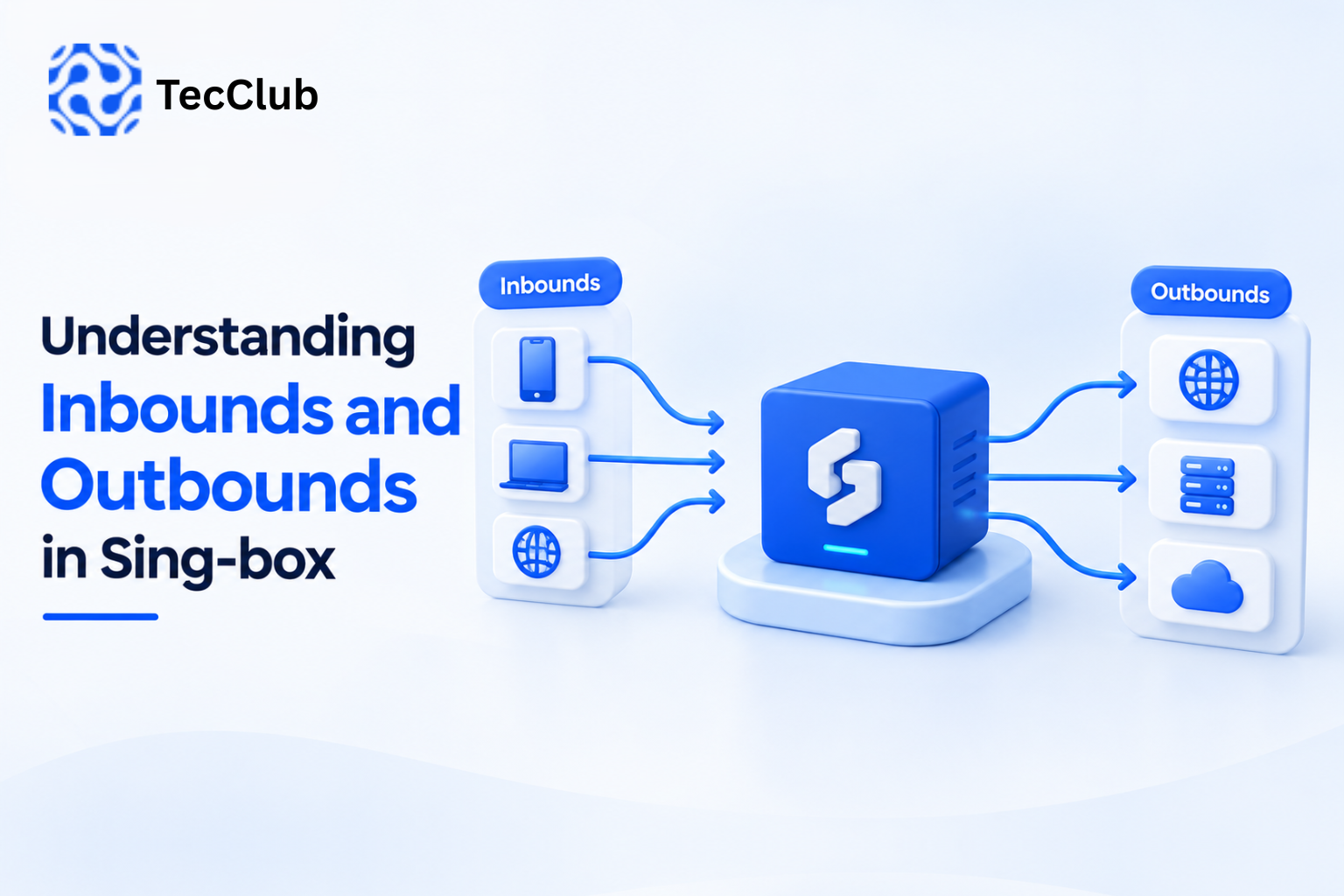
If you're working with Sing-box, two concepts appear almost everywhere in its configuration: Inbounds and Outbounds.
They may sound complicated at first, but the basic idea is straightforward:
Inbound = where traffic enters Sing-box.
Outbound = where Sing-box sends that traffic.
Between them, Sing-box uses its routing system to decide what should happen to each connection.
Sing-box's current configuration structure explicitly separates inbounds, outbounds, and route into different sections.
1. What Is an Inbound?
An inbound defines how traffic enters Sing-box.
Think of it as the entry point.
For example, traffic may enter Sing-box through:
- TUN
- SOCKS
- HTTP
- VLESS
- VMess
- Shadowsocks
- Trojan
- Hysteria
- Hysteria2
- TProxy
- Redirect
Sing-box currently provides multiple inbound types for different networking scenarios.
A simplified flow is:
Device / Application
        ↓
     Inbound
        ↓
    Sing-box
The inbound receives the connection and makes it available to the Sing-box routing system.
2. What Is an Outbound?
An outbound defines where traffic goes after Sing-box processes it.
Think of it as the exit path.
Depending on the configuration, an outbound can send traffic:
- Directly to the internet
- Through a VLESS server
- Through a VMess server
- Through a Shadowsocks server
- Through a WireGuard connection
- Through Hysteria/Hysteria2
- Through another supported proxy
- To a blocking rule
Sing-box's outbound configuration includes types such as direct, block, shadowsocks, vmess, wireguard, hysteria, vless, hysteria2, tuic, and others.
The simplified flow becomes:
Sing-box
   ↓
Outbound
   ↓
Destination
3. Inbound vs Outbound
The easiest way to remember the difference is:
| Component | Purpose |
|---|---|
| Inbound | Receives traffic |
| Route | Decides what happens to traffic |
| Outbound | Sends traffic somewhere |
| Destination | Final website, server, service, etc. |
So a complete flow can look like:
Application
     ↓
  Inbound
     ↓
   Route
     ↓
 Outbound
     ↓
 Internet / Remote Server
This separation is one of the reasons Sing-box is flexible for building complex networking configurations.
4. A Simple Example
Imagine a user opens a website while Sing-box is running.
The traffic might follow this path:
Browser
   ↓
TUN Inbound
   ↓
Routing Rules
   ↓
VLESS Outbound
   ↓
Remote VPN/Proxy Server
   ↓
Website
Here:
TUN is the inbound.
Routing rules determine the path.
VLESS is the outbound.
The website is the final destination.
5. What Does the TUN Inbound Do?
The TUN inbound is particularly important when building VPN-style applications.
It allows Sing-box to receive network traffic from the device's network layer rather than requiring every application to be individually configured with a proxy.
This is useful for applications where the goal is to route device traffic through Sing-box.
Sing-box's TUN configuration also supports routing-related options such as automatic routing and custom route addresses.
A simplified architecture looks like:
Phone / Computer
       ↓
    TUN Inbound
       ↓
     Sing-box
       ↓
   Route Rules
       ↓
   VPN Outbound
This is one reason TUN is commonly relevant when developing VPN-style clients.
6. SOCKS and HTTP Inbounds
Not every application needs a full device-level VPN.
Sing-box can also receive traffic through proxy interfaces.
For example:
Application
     ↓
SOCKS Inbound
     ↓
Sing-box
     ↓
VLESS Outbound
     ↓
Internet
The application connects to the local SOCKS proxy, and Sing-box then decides how to forward the traffic.
HTTP inbound can provide a similar model for HTTP proxy traffic.
7. Protocol Inbounds
Sing-box can also listen for traffic using supported protocol-specific inbound types.
For example:
Client
  ↓
VLESS Inbound
  ↓
Sing-box
  ↓
Route
  ↓
Outbound
This is particularly useful when Sing-box is being used as part of a server-side proxy architecture.
The inbound defines how Sing-box accepts that protocol's traffic.
8. Outbounds Can Be Different From Inbounds
An important concept is that the inbound and outbound don't have to use the same protocol.
For example:
TUN Inbound
      ↓
   Routing
      ↓
VLESS Outbound
Or:
SOCKS Inbound
      ↓
   Routing
      ↓
WireGuard Outbound
Or:
VLESS Inbound
      ↓
   Routing
      ↓
Direct Outbound
This separation gives developers considerable flexibility when designing networking architectures.
9. The Route System Connects Them
Inbounds and outbounds don't normally operate in isolation.
The route section determines which outbound should handle a connection.
Sing-box routing rules can match characteristics such as:
- Domain
- Domain suffix
- IP address
- Source IP
- Port
- Network type
- Inbound tag
- Rule sets
- Wi-Fi state
- Other connection information
The official documentation defines route rules as the mechanism for matching traffic and selecting actions/outbounds.
A simplified example:
             ┌── Direct Outbound
             │
Inbound → Route
             │
             ├── VLESS Outbound
             │
             └── Block Outbound
10. Routing by Domain
Suppose you want certain websites to go directly to the internet while other traffic uses a proxy.
You could conceptually create:
Traffic
   ↓
TUN Inbound
   ↓
Routing
   ├── Selected domains → Direct
   │
   └── Other traffic → VLESS
This is the foundation of many split-routing configurations.
11. Routing by IP
The same concept can be applied to IP ranges.
For example:
Private Network
      ↓
   Direct

Other Traffic
      ↓
   VLESS
This allows developers to create rules for local networks, specific destinations, or other IP-based requirements.
12. Routing by Inbound
Sing-box can also use the inbound tag as part of route matching.
For example, imagine two inbound entry points:
TUN Inbound
SOCKS Inbound
The routing system can treat traffic coming from them differently.
This can be useful when a configuration has multiple traffic sources that need different handling. The official route-rule configuration supports matching inbound tags.
13. Tags Make Inbounds and Outbounds Easier to Manage
In Sing-box, inbounds and outbounds can have tags.
For example:
{
  "type": "tun",
  "tag": "tun-in"
}
and:
{
  "type": "vless",
  "tag": "proxy-out"
}
The tags allow other parts of the configuration—especially routing rules—to refer to specific inbounds or outbounds.
For example, a route rule can target:
proxy-outinstead of needing to describe the entire outbound configuration again.
The official configuration structure includes a tag field for both inbound and outbound definitions.
14. Direct Outbound
A Direct outbound sends traffic directly toward its destination rather than through a proxy protocol.
Conceptually:
TUN
 ↓
Route
 ↓
Direct
 ↓
Internet
This can be useful for:
- Local traffic
- Trusted destinations
- Bypass rules
- Split tunneling
- Applications that shouldn't use a proxy
15. Block Outbound
A Block outbound can be used when traffic should not be allowed through the configured path.
For example:
Known unwanted domain
        ↓
      Route
        ↓
      Block
This can form part of traffic filtering or blocking configurations.
16. Proxy Outbounds
Sing-box supports many proxy-oriented outbound types.
For example:
TUN
 ↓
Route
 ↓
VLESS Outbound
 ↓
Remote Server
 ↓
Internet
The same architecture can use other supported protocols depending on the requirements.
This makes Sing-box useful when a project needs multiple connection methods inside one configurable networking engine.
17. Multiple Outbounds Can Exist at the Same Time
A Sing-box configuration doesn't need to have only one outbound.
You could have:
outbounds:

1. direct
2. block
3. VLESS Germany
4. VLESS Singapore
5. WireGuard USA
6. Shadowsocks Japan
The routing system can then determine which outbound should handle each connection.
This is particularly useful for VPN applications that offer multiple locations or connection methods.
18. Selector and URLTest Outbounds
Sing-box also supports outbound types designed for selecting or testing among multiple outbound options.
For example, a configuration can conceptually provide:
                    ┌── Germany
                    ├── Singapore
Selector / Test ────┼── Japan
                    └── USA
This can support applications where users manually choose a server or where the system evaluates available options.
For a VPN-style product, this can be combined with a server list in the application UI.
19. A Complete Sing-box Traffic Flow
Now let's put everything together.
Imagine a user opens an application and visits a website.
The traffic could follow:
              User Device
                   ↓
              TUN Inbound
                   ↓
             Routing Rules
                   ↓
          ┌────────┴────────┐
          ↓                 ↓
       Direct             VLESS
          ↓                 ↓
      Internet        Remote Server
                            ↓
                         Internet
Sing-box receives the traffic through an inbound, evaluates the routing rules, and sends it through the selected outbound.
That's the core concept.
20. Why Inbounds and Outbounds Matter for VPN Development
When developing a VPN application, understanding this architecture helps developers separate different responsibilities.
For example:
Client Side
Device
 ↓
TUN Inbound
 ↓
Sing-box
Routing Layer
Sing-box
 ↓
Rules
 ↓
Select Outbound
Connection Layer
Selected Outbound
 ↓
Remote VPN/Proxy Server
 ↓
Internet
This separation makes it easier to build features such as:
- Server switching
- Split tunneling
- Custom routing
- Multi-protocol support
- Domain-based routing
- Traffic blocking
- Direct connections
- Automatic server selection
21. Inbounds and Outbounds in a White-Label VPN
For a white-label VPN product, the end user doesn't need to understand any of this.
They simply see:
Connect → Connected
Behind that interface, the application may dynamically receive or construct configuration information and use the appropriate Sing-box inbounds, routes, and outbounds.
For example:
VPN App
   ↓
Backend API
   ↓
User Configuration
   ↓
Sing-box
   ↓
TUN Inbound
   ↓
Routing Rules
   ↓
Selected Outbound
   ↓
VPN Infrastructure
This is where a well-designed backend becomes important.
22. Why Correct Routing Configuration Matters
A technically valid inbound and outbound configuration can still produce poor results if the routing layer is poorly designed.
Incorrect routing can cause:
- Traffic going through the wrong server
- Local traffic being unnecessarily proxied
- DNS problems
- Routing loops
- Connection failures
- Poor performance
Sing-box provides routing options specifically for controlling how traffic is handled, including a final outbound that serves as the default outbound when no more specific routing rule determines the destination.
So developers need to think about the entire traffic path, not just the protocol configuration.
23. A Simple Mental Model
The easiest way to remember Sing-box is:
Inbound = “Where does traffic enter?”
Route = “What should happen to it?”
Outbound = “Where should it go?”
So:
          INBOUND
             ↓
     "Traffic enters here"
             ↓
           ROUTE
             ↓
     "Choose what to do"
             ↓
          OUTBOUND
             ↓
     "Send traffic here"
Once this model is clear, Sing-box configuration becomes much easier to understand.
How TecClub Technology Uses Sing-box Concepts
At TecClub Technology, Sing-box can be incorporated into VPN solutions where flexible protocol support and routing control are required.
Depending on the project, a VPN platform can combine:
- Sing-box integration
- TUN-based traffic handling
- Multiple inbound/outbound configurations
- VLESS, VMess, Shadowsocks and other supported protocols
- Custom routing rules
- Server selection
- Backend/API integration
- User and subscription management
- Android, iOS, Windows and macOS applications
- Server monitoring and management
The goal is to hide the underlying networking complexity from the end user while providing developers and administrators with the control needed to operate the platform.
Conclusion
Inbounds and outbounds are two of the fundamental building blocks of Sing-box.
An inbound defines how traffic enters Sing-box. The routing system then evaluates that traffic and determines what should happen. Finally, an outbound defines how the traffic leaves Sing-box and reaches its next destination.
The complete concept is simple:
Inbound → Route → Outbound
Once you understand this flow, features such as multi-protocol VPNs, split routing, server selection, direct connections, and traffic filtering become much easier to understand and design.
For modern VPN applications, Sing-box provides a flexible foundation where different traffic sources, routing rules, and connection methods can be combined within one architecture.